top of page

[Nik Collection 9 Review] AI takes on the "tedious tasks." Nik 9 changes the pace of photo creation.


DxO Labs' latest Nik Collection 9 isn't a tool where AI finishes your photos for you. It's a tool that takes over all the tedious work, allowing you to focus solely on creative decisions. You'll notice the difference as soon as you start using it.


01

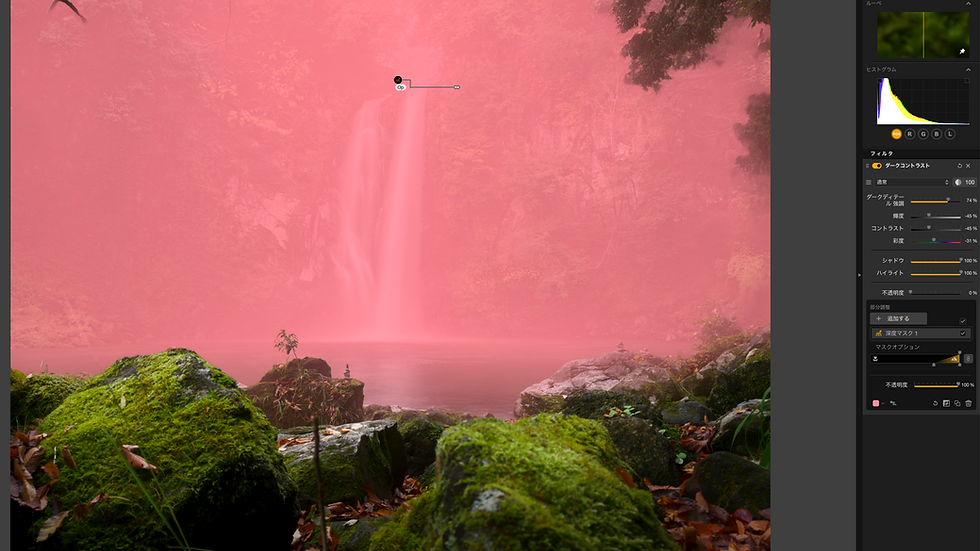
No more wasting time cutting masks — AI Depth Mask

Honestly, manually tracing the boundaries between complex backgrounds was a pain. Depth Mask takes care of that completely. The AI analyzes the depth of the photo and automatically divides it into "foreground, middle, and background," so all you have to do is decide "what to change and how."

It's not that the AI is being overly helpful, but rather that it's preparing the groundwork to execute your instructions faster and more accurately. I 'm genuinely happy that it achieves both precision and speed.


The tree in the upper right is being gently illuminated, while the waterfall immediately to its left is being hit more intensely.

By utilizing this difference in depth, you can create a natural-looking foggy atmosphere.

02

Move colors together with a single wheel — New color grading

Previously, I had to switch screens every time I adjusted highlights, midtones, and shadows, but now I can do it all with a single color wheel. This alone has significantly changed the pace of my photo development. I can fine-tune the overall color balance without moving my eyes, so I almost completely eliminate the need to "check something and then go back." Once you get used to this rhythm, it's hard to go back.


03 Design even the color of the light yourself — Halation

Halation is an effect that simulates the blurring of light, but in Nik 9, you can even freely adjust the "color" of the blur. You can intensify the red of a sunset or deliberately cool the night lights with a bluish tint—it's all at your discretion. It's like adding "temperature" to your photos afterward.

AI guarantees the precision of masking, and new effects supplement the inspiration. I think what Nik 9 has increased is not the number of functions, but the time itself spent thinking about "what kind of light to capture."


0 The freedom to "redesign" 4 colors — Chromatic Shift × Glass Effect

Chromatic Shift doesn't roughly change the colors of the entire photo; instead, it's a function that allows you to target and shift only specific colors to other colors. Shifting the red of a neon sign to green or yellow instantly creates a cyberpunk aesthetic—this kind of "post-shoot color redesign" can be completed with intuitive operation.


Left: Chromatic Shift only. The intentional misalignment of the neon red and blue emphasizes the cyberpunk atmosphere. Right: + Glass Effect. The texture of raindrops running down a windowpane is added on top of the colors, creating an even more emotional expression.


Conclusion: What Nik 9 has given us

AI guarantees masking precision, and new effects supplement your inspiration. Nik Collection 8 doesn't just add a number of features; it adds the time you need to carefully consider, "What kind of light do I want to capture?"

Reader Exclusive

Special discount coupon: 25% off

【FUJIWARA2025

For new users. Valid for use in 2026 as well. This is a high discount rate rarely seen elsewhere, so please feel free to use it. This discount is only possible because I am one of the few DxO PhotoLab Ambassadors in the world, and the only one in Japan.


Comments


Category
archive
Social media
  • Facebook Basic Square
  • Twitter Basic Square
  • Instagramの社会のアイコン
Lr preset
article list
©YoshikiFujiwara
bottom of page